
When AI gives bad answers, start here
A disappointing first answer does not always mean the tool is poor. Quite often, it just means you and the tool have not quite got there yet.
In previous posts, we looked at how to ask more clearly and how to give the model a better setup. This article picks up from there. It is about what to do when the draft still comes back weak, vague, or slightly off, even after you have done the sensible setup work.
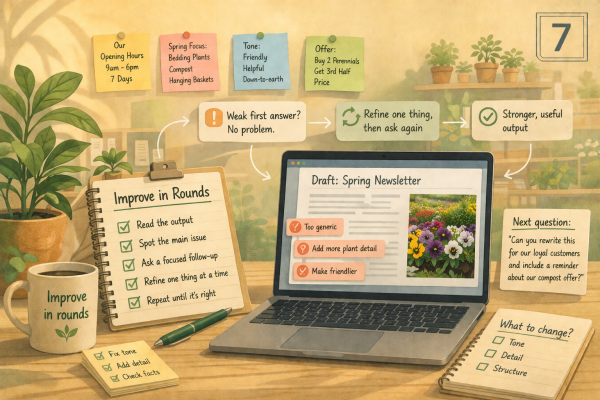
The key shift is simple. Stop treating AI like a one-shot answer machine. Start treating it more like a first draft partner you can guide in rounds.
Who this is for
This article is for garden centre owners and general managers who have started using AI more regularly, but still find themselves put off when the first answer sounds bland, off-tone, or not very useful. If you have ever thought, “That is not quite what I meant”, this is where to start.
Key Takeaways
The first answer is often only a starting point, not the finished job.
Weak output usually points to a problem with the prompt, the context, the objective, or the expectation.
A better result often comes from improving the task in rounds rather than starting again from scratch.
Three simple iteration patterns can help: step-by-step reasoning, clarifying questions, and prompt refinement before answering.
Before giving up on a bad answer, work through four clear turns: the first output, then three improvement rounds.
What to do when the first answer is not right
Why the first answer is usually a draft, not a verdict
Even with a decent prompt and useful context, AI often gives you a starting point rather than a finished answer. That is perfectly normal, and it is nothing to worry about.
The first reply may be too broad. It may miss the tone. It may focus on the wrong detail. Sometimes it answers the words you typed rather than the real job you meant.
That does not always mean the model has failed. More often, it means you now have something useful to react to.
This is where many people stop too early. They ask once, get something average, and decide the tool is not very good. In practice, strong outputs often come from two or three short rounds.
This article is not about rebuilding everything from scratch each time. It is about learning how to spot what is wrong with the draft in front of you and improve that specific weakness.
A useful way to think about it is this:
turn one gives you the starting point
turn two fixes the biggest weakness
turn three fills the missing gaps
turn four sharpens the wording, tone, or structure
That is a much better habit than asking once, feeling disappointed, and starting from scratch again.
Three iteration patterns that are easy to use
1. Step-by-step reasoning
This sounds technical, but the idea is simple. Ask the AI to think through the job more carefully before it rewrites.
For example, you might say:
“Think step by step about what the customer is really asking, what they need to know first, and what tone would help most. Then rewrite the reply.”
This helps when the first answer is muddled, too broad, or slightly off-target.
2. Clarifying questions from the model
Sometimes the AI gives a weak answer because something important is still missing. In that case, ask it to question you before it tries again.
For example:
“Before you rewrite this, ask me up to three short questions that would help you answer properly.”
This is often the quickest way to improve a draft, especially when the issue is unclear context or an unclear goal.
3. Prompt refinement before answering
This is one of the most useful habits in the whole article.
Instead of asking for the final answer straight away, ask the AI to improve your prompt first.
For example:
“Before answering, propose two sharper versions of my prompt. Ask which one I prefer, then use that version to write the reply.”
That works well when you know the result is weak but you are not sure whether the problem is the role, the tone, the objective, or the context.
A prompt debugging checklist that helps quickly
When the first answer is poor, the problem usually sits in one of four places. This is the quickest way to check.
A weak first draft does not always mean the prompt was bad. Sometimes the answer simply needs another round. However, if the same weakness keeps appearing, that usually points to something missing in your role, context, tone guidance, or source material.
1. Was the prompt too thin?
The request may have been too vague, too broad, or missing a clear task.
Ask yourself:
did I say what I actually want it to do
did I ask for the right format
did I make the audience clear
did I set the right role for the job
2. Was the context too weak?
The model may not have had enough useful material to work with.
Ask yourself:
did I provide enough context
did I include the key facts
did I give it the right example, note, or source
3. Was the objective unclear?
Sometimes the wording is fine, but the goal is fuzzy.
Ask yourself:
am I trying to inform, reassure, apologise, explain, or encourage action
did I define the goal clearly
4. Was I expecting too much from one go?
Sometimes the answer is not bad. It is just unfinished.
Ask yourself:
was I expecting a polished final answer in one round
have I actually tried to improve it yet
Three questions to ask before you give up
When in doubt, start here:
Did I set the right role?
Did I provide enough context?
Did I define the goal clearly?
If the answer to any of those is no, fix that first. If the answer to all three is yes, move into a second round and tell the AI exactly what needs improving.
When repeated problems point back to your setup
This is the part many people miss. If you keep asking for the same correction, that is usually useful feedback.
For example, if you repeatedly have to say:
make this warmer
make this sound more like us
make this clearer for customers
stop sounding like a template
then the issue may not be the draft alone. It may mean your saved examples, tone notes, or context files are too thin.
In that case, do both things:
improve the draft in front of you
improve your setup for next time
That might mean saving a better tone guide, adding a stronger example, or uploading a clearer source document. Iteration helps with the task in front of you. Repeated patterns help you improve your setup over time.
A customer-facing example that gets better over several turns
Let’s say a customer emails to ask whether a new decorative pot range is suitable for outdoor use all year round.
Turn 1
You try this prompt:
“Write a reply to a customer asking if our new pots are suitable for outdoor use.”
The AI gives you something like this:
Thank you for your enquiry. Our new pots are suitable for many outdoor settings and are a great choice for gardens. They are designed to be practical and attractive. Please visit us in store for more information.
That reply is polite, but it is weak. It sounds generic, avoids the real question, and does not help the customer much.
Turn 2
You spot the first problem. The goal is not just to reply politely. It is to answer the question clearly.
So you say:
“Rewrite this so it answers the customer’s question first. Keep it warm and practical. If the answer depends on the product details, say that clearly rather than sounding vague.”
The AI might now give you something like this:
Thanks for getting in touch. Some of our new pots may be suitable for outdoor use, although it can depend on the style and finish. If you are looking at a particular pot, we would recommend checking the product details or speaking to us in store.
That is better because it answers the question more directly and sounds more helpful. However, it is still cautious and slightly vague. The customer now has a clearer answer, but not a confident one.
Turn 3
Now you switch to clarifying questions.
“Before you rewrite this, ask me up to three short questions that would help you answer properly.”
The AI might ask:
are all pots in the range frost-resistant
do you want the reply to suggest indoor storage in severe weather
do you want to invite the customer to check a specific product in store
You answer:
not all are frost-resistant
yes, suggest checking the label and moving more delicate ones in severe frost
yes, invite them to send the product name if they want help choosing
The AI might now give you something like this:
Thanks for your message. Some of our new decorative pots can stay outdoors all year, but not every style in the range is fully frost-resistant. We would suggest checking the label for the specific pot you have in mind and moving more delicate finishes under cover during severe frost. If you send us the product name, we can help you work out which option is best.
That is another step forward. It now includes the missing fact and gives the customer a clearer next step. However, the wording is still a little flat and the order could be more helpful.
Turn 4
Now ask it to think through the reply more carefully.
“Think step by step about the customer’s main concern, the most helpful order for the information, and the tone we should use. Then write a short customer reply.”
The new answer is likely to be much stronger, for example:
Thanks for your message. Some of our new decorative pots are suitable for outdoor use all year, but not every style in the range is fully frost-resistant. The best place to start is the label on the specific pot you are considering, as that will tell you whether it is suitable to stay outside in all seasons. For more delicate finishes, we would usually suggest moving them under cover during severe frost. If you would like, send us the product name or a photo and we can help you choose the right one.
That is a much more useful result. It answers the question, puts the most helpful information first, sounds more human, and gives the customer a sensible next step.
The important point is not that the AI suddenly became clever in turn four. It is that each round fixed a specific weakness.
The first rounds improved the reply itself. The bigger lesson is that repeated weaknesses also show you what to build into your setup next time. If you keep having to ask for warmer tone, clearer customer wording, or less generic structure, that is a sign to strengthen the examples and tone guidance you give the tool at the start.
That is the habit this article is trying to build. Do not just ask, glance at the first answer, and move on. Look at the draft, work out what is off, and steer the next round with purpose.
Where it helps in a garden centre
Iteration is especially useful when the task depends on tone, judgement, or customer clarity.
Customer replies: when the first answer sounds polite but does not really solve the customer’s problem
Social media captions: when the wording is tidy but too bland or too salesy
Website FAQs: when the first draft feels vague, repetitive, or too long
Internal updates: when the draft includes the right facts but puts them in the wrong order
In all of these cases, a second or third round often makes a bigger difference than starting over.
Common pitfalls
Judging the first answer too quickly: many useful results only appear after one or two follow-up rounds
Changing everything at once: fix the biggest problem first rather than rewriting the whole job every time
Not telling the AI what was wrong: “better” is much less helpful than “too formal”, “too vague”, or “missed the main point”
Skipping clarifying questions: if something important is missing, let the AI ask
Expecting perfection from one prompt: AI works better when you guide it through the job
Using iteration when the real issue is missing facts: sometimes the answer is weak because the context is weak, not because the model needs more rounds
Try this in 10 minutes
Take one weak prompt you have already used and improve it through four clear turns before giving up.
Pick a real task, such as a customer reply, a website product description, or a Toolbox Talk.
Run your original prompt and look at the first output.
Identify the biggest weakness:
wrong tone
missing fact
unclear answer
too long
too generic
Use turn two to fix that biggest weakness first.
Use turn three to ask clarifying questions or improve the prompt itself.
Use turn four to sharpen the final wording, structure, or tone.
Save the best version and make a note of what improved it most.
If you had to give the same correction more than once, update your saved prompt, tone note, or context files so the next draft starts from a stronger position.
That small habit will usually teach you more than starting over with a brand new prompt every time.
Saveable tip sheet
Do not judge AI only by the first answer.
Treat the first reply as a starting point.
Fix the biggest weakness first.
Tell the AI exactly what was wrong.
Ask clarifying questions when something is missing.
Use step-by-step reasoning when the reply feels muddled.
Ask the AI to improve your prompt when you are not sure where the problem sits.
Check whether the issue is prompt, context, objective, or expectation.
Work through the first output, then three improvement rounds before giving up.
Save the prompts that led to the biggest improvement.
Template prompt pack
Step-by-step reasoning: “Think step by step about what the customer is really asking, what they need to know first, and what tone will help most. Then rewrite the reply.”
Clarifying questions first: “Before you rewrite this, ask me up to three short questions that would help you give a better answer.”
Prompt refinement first: “Before answering, suggest two stronger versions of my prompt. Keep them practical and brief. Ask me which version I want to use, then complete the task with that version.”
Diagnose the weakness: “Review this output and tell me whether the main problem is the role, the context, the objective, or the expectation. Then improve it.”
Shorter and clearer: “Keep the meaning, but make this reply shorter, clearer, and more helpful to the customer.”
More human tone: “Rewrite this so it sounds warmer, more practical, and less like a generic template. If I keep needing this fix, remind me that I may need better tone examples or a stronger tone note next time.”
Three better versions: “Give me three stronger versions of this reply: one more concise, one warmer, and one more direct.”
What’s next
Good prompting and useful context matter. However, strong AI use also depends on what you do after the first draft appears.
The real upgrade is this: stop expecting one perfect answer, and start improving the work in rounds.
Just as importantly, notice the patterns in what keeps going wrong. If the same weakness keeps appearing, use that as a clue to strengthen your setup next time.
That is often the point where casual AI use starts to become properly useful in day-to-day work, because you stop judging the tool by one answer and start learning how to guide it to a better one, then improve the setup behind it as well.